Course: Deep Learning for Solving and Estimating Dynamic Models in Economics and Finance
Script reference: §1.5–1.8 (Training and regularization: TensorBoard instrumentation)
Notebook role: extension
Author: Simon Scheidegger
RUN_MODE = "smoke"  # one of: "smoke", "teaching", "production"
SEED = 0
Monitoring training with TensorBoard¶
TensorBoard is TensorFlow’s interactive dashboard for inspecting training dynamics: scalar metrics (loss, MAE), weight and gradient histograms, the computational graph, and embeddings.
In this notebook we:
Generate a synthetic 2-D regression problem .
Train a small Keras MLP and stream training metrics into a
./logsdirectory via theTensorBoardcallback.Save model checkpoints with
ModelCheckpoint.Inspect the logs both inline (with the
%tensorboardmagic) and from the command line (tensorboard --logdir=./logs).
Why care? Out-of-the-box model.fit only prints scalar summaries to stdout;
TensorBoard lets you watch losses, parameter histograms, and even embeddings
evolve epoch by epoch. This is essential for debugging deep-learning training
for economic models (Day 2 onward), where loss curves are the primary signal
that the network is converging to a sensible policy.
import os, datetime, shutil
import numpy as np
import matplotlib.pyplot as plt
import tensorflow as tf
from tensorflow.keras import Sequential
from tensorflow.keras.layers import Dense, Input
from tensorflow.keras.callbacks import ModelCheckpoint, TensorBoard
from sklearn.model_selection import train_test_split

%matplotlib inline

np.random.seed(SEED)
tf.random.set_seed(SEED)

print(f'TensorFlow {tf.__version__}')
2026-04-19 19:56:40.566541: E external/local_xla/xla/stream_executor/cuda/cuda_fft.cc:477] Unable to register cuFFT factory: Attempting to register factory for plugin cuFFT when one has already been registered
WARNING: All log messages before absl::InitializeLog() is called are written to STDERR
E0000 00:00:1776621400.587139  138204 cuda_dnn.cc:8310] Unable to register cuDNN factory: Attempting to register factory for plugin cuDNN when one has already been registered
E0000 00:00:1776621400.592739  138204 cuda_blas.cc:1418] Unable to register cuBLAS factory: Attempting to register factory for plugin cuBLAS when one has already been registered
2026-04-19 19:56:40.610413: I tensorflow/core/platform/cpu_feature_guard.cc:210] This TensorFlow binary is optimized to use available CPU instructions in performance-critical operations.
To enable the following instructions: AVX2 FMA, in other operations, rebuild TensorFlow with the appropriate compiler flags.
TensorFlow 2.18.0
1. Synthetic data¶
on .
def generate_data(n):
    x = np.random.uniform(-2, 2, n)
    y = np.random.uniform(-2, 2, n)
    z = np.sin(x) * np.exp(y)
    return np.vstack((x, y)).T.astype(np.float32), z.astype(np.float32)

X, z = generate_data(10_000)
X_tr, X_te, z_tr, z_te = train_test_split(X, z, test_size=0.2, random_state=42)
print(f'Train: {X_tr.shape}, test: {X_te.shape}')
Train: (8000, 2), test: (2000, 2)
2. Model and callbacks¶
Two-hidden-layer ReLU MLP; Adam optimiser; MSE loss.
We attach two callbacks:
ModelCheckpoint— saves weights every epoch under./checkpoints/.TensorBoard— writes scalar/histogram summaries under./logs/<timestamp>/.
model = Sequential([
    Input(shape=(2,)),
    Dense(128, activation='relu'),
    Dense(128, activation='relu'),
    Dense(1),
])
model.compile(optimizer='adam', loss='mse', metrics=['mae'])
model.summary()
2026-04-19 19:56:43.490802: E external/local_xla/xla/stream_executor/cuda/cuda_driver.cc:152] failed call to cuInit: INTERNAL: CUDA error: Failed call to cuInit: UNKNOWN ERROR (303)
# Fresh log + checkpoint directories so re-runs do not collide.
ckpt_dir = './checkpoints'
log_dir  = os.path.join('logs', datetime.datetime.now().strftime('%Y%m%d-%H%M%S'))
shutil.rmtree(ckpt_dir, ignore_errors=True)
os.makedirs(ckpt_dir, exist_ok=True)
os.makedirs(log_dir, exist_ok=True)

ckpt_cb = ModelCheckpoint(
    filepath=os.path.join(ckpt_dir, 'epoch_{epoch:02d}.weights.h5'),
    save_weights_only=True,
    verbose=0,
)
tb_cb = TensorBoard(log_dir=log_dir, histogram_freq=1)

print(f'TensorBoard log dir: {log_dir}')
print(f'Checkpoint dir:    {ckpt_dir}')
TensorBoard log dir: logs/20260419-195643
Checkpoint dir:    ./checkpoints
3. Training¶
50 epochs, batch size 128. The callbacks fire automatically each epoch.
history = model.fit(
    X_tr, z_tr,
    validation_data=(X_te, z_te),
    epochs=50, batch_size=128,
    callbacks=[ckpt_cb, tb_cb],
    verbose=2,
)

test_loss, test_mae = model.evaluate(X_te, z_te, verbose=0)
print(f'\nTest MSE = {test_loss:.4e}, MAE = {test_mae:.4e}')
Epoch 1/50
63/63 - 1s - 22ms/step - loss: 1.3788 - mae: 0.6591 - val_loss: 0.2860 - val_mae: 0.3570
Epoch 2/50
63/63 - 0s - 4ms/step - loss: 0.1612 - mae: 0.2463 - val_loss: 0.1063 - val_mae: 0.2007
Epoch 3/50
63/63 - 0s - 4ms/step - loss: 0.0781 - mae: 0.1699 - val_loss: 0.0594 - val_mae: 0.1473
Epoch 4/50
63/63 - 0s - 4ms/step - loss: 0.0432 - mae: 0.1291 - val_loss: 0.0332 - val_mae: 0.1117
Epoch 5/50
63/63 - 0s - 4ms/step - loss: 0.0252 - mae: 0.1019 - val_loss: 0.0208 - val_mae: 0.0885
Epoch 6/50
63/63 - 0s - 5ms/step - loss: 0.0166 - mae: 0.0842 - val_loss: 0.0146 - val_mae: 0.0773
Epoch 7/50
63/63 - 1s - 9ms/step - loss: 0.0117 - mae: 0.0702 - val_loss: 0.0112 - val_mae: 0.0686
Epoch 8/50
63/63 - 0s - 4ms/step - loss: 0.0088 - mae: 0.0599 - val_loss: 0.0088 - val_mae: 0.0609
Epoch 9/50
63/63 - 0s - 4ms/step - loss: 0.0068 - mae: 0.0522 - val_loss: 0.0071 - val_mae: 0.0550
Epoch 10/50
63/63 - 0s - 4ms/step - loss: 0.0054 - mae: 0.0455 - val_loss: 0.0061 - val_mae: 0.0525
Epoch 11/50
63/63 - 0s - 4ms/step - loss: 0.0045 - mae: 0.0411 - val_loss: 0.0053 - val_mae: 0.0491
Epoch 12/50
63/63 - 0s - 5ms/step - loss: 0.0038 - mae: 0.0384 - val_loss: 0.0048 - val_mae: 0.0464
Epoch 13/50
63/63 - 0s - 4ms/step - loss: 0.0033 - mae: 0.0362 - val_loss: 0.0042 - val_mae: 0.0430
Epoch 14/50
63/63 - 0s - 4ms/step - loss: 0.0028 - mae: 0.0334 - val_loss: 0.0036 - val_mae: 0.0406
Epoch 15/50
63/63 - 0s - 4ms/step - loss: 0.0024 - mae: 0.0313 - val_loss: 0.0031 - val_mae: 0.0389
Epoch 16/50
63/63 - 0s - 5ms/step - loss: 0.0022 - mae: 0.0304 - val_loss: 0.0027 - val_mae: 0.0384
Epoch 17/50
63/63 - 0s - 4ms/step - loss: 0.0021 - mae: 0.0299 - val_loss: 0.0024 - val_mae: 0.0377
Epoch 18/50
63/63 - 0s - 4ms/step - loss: 0.0019 - mae: 0.0288 - val_loss: 0.0022 - val_mae: 0.0364
Epoch 19/50
63/63 - 0s - 5ms/step - loss: 0.0017 - mae: 0.0273 - val_loss: 0.0019 - val_mae: 0.0338
Epoch 20/50
63/63 - 0s - 4ms/step - loss: 0.0015 - mae: 0.0257 - val_loss: 0.0018 - val_mae: 0.0331
Epoch 21/50
63/63 - 0s - 4ms/step - loss: 0.0013 - mae: 0.0244 - val_loss: 0.0018 - val_mae: 0.0334
Epoch 22/50
63/63 - 0s - 4ms/step - loss: 0.0012 - mae: 0.0234 - val_loss: 0.0018 - val_mae: 0.0345
Epoch 23/50
63/63 - 0s - 4ms/step - loss: 0.0011 - mae: 0.0224 - val_loss: 0.0019 - val_mae: 0.0353
Epoch 24/50
63/63 - 0s - 4ms/step - loss: 9.9862e-04 - mae: 0.0214 - val_loss: 0.0018 - val_mae: 0.0351
Epoch 25/50
63/63 - 0s - 4ms/step - loss: 9.0592e-04 - mae: 0.0203 - val_loss: 0.0017 - val_mae: 0.0346
Epoch 26/50
63/63 - 0s - 4ms/step - loss: 8.1929e-04 - mae: 0.0193 - val_loss: 0.0017 - val_mae: 0.0350
Epoch 27/50
63/63 - 0s - 4ms/step - loss: 7.5364e-04 - mae: 0.0184 - val_loss: 0.0017 - val_mae: 0.0351
Epoch 28/50
63/63 - 0s - 4ms/step - loss: 6.9287e-04 - mae: 0.0176 - val_loss: 0.0015 - val_mae: 0.0325
Epoch 29/50
63/63 - 0s - 4ms/step - loss: 6.3489e-04 - mae: 0.0167 - val_loss: 0.0012 - val_mae: 0.0293
Epoch 30/50
63/63 - 0s - 5ms/step - loss: 5.8405e-04 - mae: 0.0160 - val_loss: 0.0011 - val_mae: 0.0261
Epoch 31/50
63/63 - 0s - 4ms/step - loss: 5.3829e-04 - mae: 0.0153 - val_loss: 9.1121e-04 - val_mae: 0.0235
Epoch 32/50
63/63 - 0s - 4ms/step - loss: 5.0640e-04 - mae: 0.0148 - val_loss: 8.2765e-04 - val_mae: 0.0217
Epoch 33/50
63/63 - 0s - 4ms/step - loss: 4.8442e-04 - mae: 0.0146 - val_loss: 8.8536e-04 - val_mae: 0.0231
Epoch 34/50
63/63 - 0s - 4ms/step - loss: 4.7775e-04 - mae: 0.0146 - val_loss: 0.0010 - val_mae: 0.0265
Epoch 35/50
63/63 - 0s - 4ms/step - loss: 4.7626e-04 - mae: 0.0146 - val_loss: 0.0012 - val_mae: 0.0286
Epoch 36/50
63/63 - 0s - 4ms/step - loss: 4.7209e-04 - mae: 0.0145 - val_loss: 0.0012 - val_mae: 0.0290
Epoch 37/50
63/63 - 0s - 4ms/step - loss: 4.6236e-04 - mae: 0.0144 - val_loss: 0.0011 - val_mae: 0.0278
Epoch 38/50
63/63 - 0s - 4ms/step - loss: 4.4593e-04 - mae: 0.0142 - val_loss: 0.0010 - val_mae: 0.0263
Epoch 39/50
63/63 - 0s - 4ms/step - loss: 4.3352e-04 - mae: 0.0142 - val_loss: 9.7973e-04 - val_mae: 0.0256
Epoch 40/50
63/63 - 0s - 5ms/step - loss: 4.3245e-04 - mae: 0.0143 - val_loss: 9.3986e-04 - val_mae: 0.0249
Epoch 41/50
63/63 - 0s - 4ms/step - loss: 4.2289e-04 - mae: 0.0142 - val_loss: 9.3984e-04 - val_mae: 0.0248
Epoch 42/50
63/63 - 0s - 4ms/step - loss: 4.2059e-04 - mae: 0.0143 - val_loss: 9.4197e-04 - val_mae: 0.0248
Epoch 43/50
63/63 - 0s - 4ms/step - loss: 4.1355e-04 - mae: 0.0143 - val_loss: 9.7213e-04 - val_mae: 0.0249
Epoch 44/50
63/63 - 0s - 4ms/step - loss: 4.1023e-04 - mae: 0.0144 - val_loss: 9.7569e-04 - val_mae: 0.0245
Epoch 45/50
63/63 - 0s - 4ms/step - loss: 3.9893e-04 - mae: 0.0142 - val_loss: 0.0010 - val_mae: 0.0246
Epoch 46/50
63/63 - 0s - 4ms/step - loss: 3.9605e-04 - mae: 0.0142 - val_loss: 9.7829e-04 - val_mae: 0.0235
Epoch 47/50
63/63 - 0s - 4ms/step - loss: 3.7400e-04 - mae: 0.0139 - val_loss: 9.4228e-04 - val_mae: 0.0227
Epoch 48/50
63/63 - 0s - 4ms/step - loss: 3.5374e-04 - mae: 0.0135 - val_loss: 8.6306e-04 - val_mae: 0.0213
Epoch 49/50
63/63 - 0s - 4ms/step - loss: 3.3017e-04 - mae: 0.0130 - val_loss: 7.9062e-04 - val_mae: 0.0200
Epoch 50/50
63/63 - 0s - 4ms/step - loss: 3.0907e-04 - mae: 0.0125 - val_loss: 6.3947e-04 - val_mae: 0.0176
Test MSE = 6.3947e-04, MAE = 1.7582e-02
4. Inspecting the logs¶
4a. Inline (Jupyter magic)¶
Inside a notebook you can launch TensorBoard directly with the %tensorboard
magic. The cell below loads the extension and embeds the dashboard.
On Nuvolos the magic is the recommended path because it serves the dashboard inside the notebook iframe — no extra port forwarding needed.
# Load the TensorBoard notebook extension and start the dashboard.
# (If %tensorboard is not displayed inline on your platform, use the CLI
# instructions in the next markdown cell.)
%load_ext tensorboard
# Uncomment the next line to launch TensorBoard inline:
# %tensorboard --logdir logs
print('TensorBoard extension loaded. Run %tensorboard --logdir logs to view.')
TensorBoard extension loaded. Run %tensorboard --logdir logs to view.
4b. From the command line¶
From a terminal in the same directory:
tensorboard --logdir=./logs --port 6006Then open http://localhost:6006 in a browser. Tabs to look at:
Scalars:
epoch_loss,epoch_mae, plus the validation versions. The two curves should track each other; a wide gap signals over-fitting.Histograms: distribution of weights and biases per layer, per epoch. Watch for distributions that collapse to zero (dead neurons) or explode.
Graphs: the static computational graph TensorFlow built for the model.
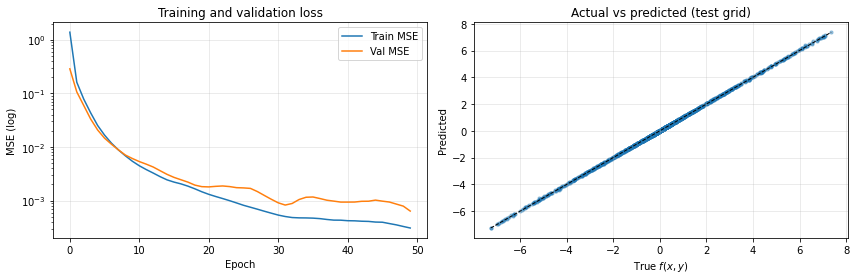
5. Sanity-check plots (no TensorBoard required)¶
Even without the dashboard, the History object returned by fit contains
the same per-epoch metrics. We use it to plot the loss curve and an
actual-vs-predicted scatter.
fig, axes = plt.subplots(1, 2, figsize=(12, 4))

axes[0].semilogy(history.history['loss'],     label='Train MSE')
axes[0].semilogy(history.history['val_loss'], label='Val MSE')
axes[0].set_xlabel('Epoch')
axes[0].set_ylabel('MSE (log)')
axes[0].set_title('Training and validation loss')
axes[0].legend()
axes[0].grid(True, alpha=0.3)

X_new, z_new = generate_data(2000)
z_pred = model.predict(X_new, verbose=0).flatten()
axes[1].scatter(z_new, z_pred, alpha=0.4, s=10)
lo, hi = z_new.min(), z_new.max()
axes[1].plot([lo, hi], [lo, hi], 'k--', lw=1)
axes[1].set_xlabel('True $f(x,y)$')
axes[1].set_ylabel('Predicted')
axes[1].set_title('Actual vs predicted (test grid)')
axes[1].grid(True, alpha=0.3)

plt.tight_layout()
plt.show()
Recap¶
Two callbacks are enough to instrument any Keras training loop with TensorBoard logging and per-epoch checkpoints.
The dashboard becomes invaluable in Day 2+ where we train neural networks to solve dynamic stochastic models — there, watching the loss components (Euler residuals, market clearing) live is the only way to catch a stuck training run early.